WeChat chat record data analysis artifact is here! Open source and free, support visualization, annual report, and export PDF/Word
WeChat chat data analysis software
There is currently no software on the market for data analysis for WeChat chat data, at least I haven't seen it yet, including WeChat has not done data analysis-related functions, I believe many people should have some needs for WeChat chat data visualization, such as viewing their own chat data this year, what is the most frequent text in the chat? Who do you interact with the most? How many chats are there per day? Export chat history and other needs...
However, there is no similar software on the market
Now, this problem is solved, there is a software that specializes in visualizing WeChat chat data, or it can also be said to be a management tool for WeChat chat records. Today I will share it with you, everyone can use it to your heart's content, the software is open source software, and everyone can use it for free.
Download address reference at the end of the article, this software can only be used on Windows computers.
function
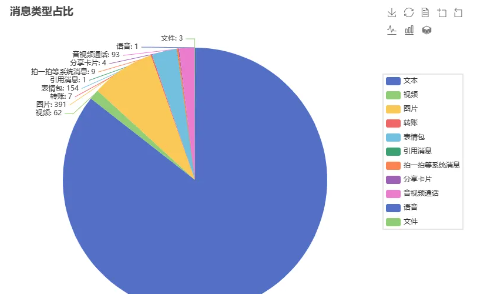
Read the local data of the computer and restore the chat interface (including text, audio and video, pictures, emoticons, take a shot and other message types) Analyze chat data with a friend
[Including statistical information + chat annual report + sentiment analysis + chat history export to web page|pdf|word]
Own annual chat report Export the circle of friends as a PDF or web page Export all chats Export all your friends Access AI to complete Q&A based on your chat data
Screenshot of the effect
Installation tutorial
Step 1: Download the compressed package, unzip the file, and double-click to open the "MemoTrace.exe 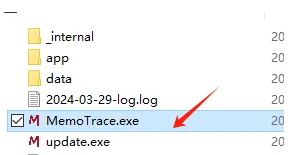
If the database does not exist, click OK ⚠️ Note: If there is a crash, please right-click to select run the exe program as administrator, the program does not have any virus, if the antivirus software prompts that there is a risk, you can choose to skip it, and the key is none to restart the computer
Step 2: Log in to WeChat Step 3: Click Get Information
Under normal circumstances, all information will be automatically filled, and you can just click to start it 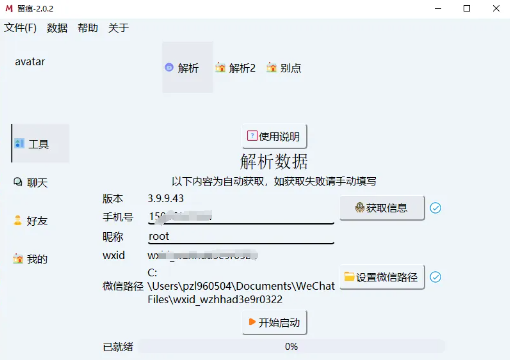
If the WeChat path acquisition fails, if wxid is displayed as none, try a few more times, if it doesn't work, restart the computer and try again, 90% can be solved, if the key is wrong, there is a big brother who modified the WeChat file save path to another location and succeeded, pay attention to the path is best not to contain Chinese, after modifying the path, also remember to restart WeChat or restart the computer, if it really doesn't work, you can enter the group to feedback that there is a problem with decryption, you can close WeChat after obtaining the information, and then click to start starting.
Step 4: Click Start Startup, and click the "Restart" button when the startup is complete
Unable to restart automatically, please open the software manually
Step 5: After the data initialization is completed, you can use the various functions directly on the UI interface.
Note: Chat records and other export methods can be selected html, word, pdf, etc., the final generation of the annual report is an html file, which will automatically open the web page, and you can enjoy watching your chat data on the web page.
How to get it
software download address.
MemoTrace-2.1.1.rar: https://url98.ctfile.com/f/20967998-8452865878-131225?p=4565
(Access Password: 4565 )
欢迎关注微信公众号:泛米米的小菜园
12本阳台种菜电子书限时免费送
关注【泛米米的小菜园】,发送“电子书”免费获取
随时随地在手机上学习交流阳台种菜
这篇文章出自 fanmimi 如需转载请注明出处;
这篇文章的地址:http://fanmimi.com/2025/593.html
本站部分资源收集于网络,纯个人收藏,无商业用途,如有侵权请及时告知!
 我终于找见那11道题的答案了
 33句爱的真言,有人看了第一句就哭了
 泛米米优惠券网微信公众号自助查询淘宝天猫隐藏优惠券3种方法详解
 微信查券机器人、微信公众号自动查询淘宝优惠券系统建设详细步骤
 一场激励千万人燃烧激情的演讲
 永远不要对父母说的十句话
 公众符号背书_一个月后营收就翻了好几倍